Everything on this page is important to achieving great screen prints. Thank you for taking the time to read and please let us know if you have any questions!
Properly formatted artwork is massively important to achieve good prints. We recommend using a qualified artist or graphic designer that knows how to format artwork for shirt printing. AI Chatbots are not graphic designers. If you need recommendations, we regularly work with several artists of varying styles that take commissions. We also understand everyone is working with different budgets. If you aren’t sure, send over what you have and we’ll see what we can do with it.
To get the best quality prints of non-vector art, please follow these specifications:
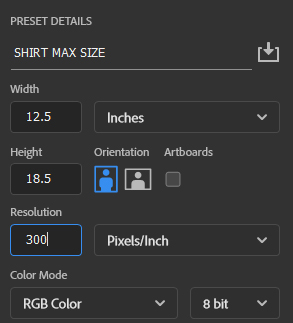
Size: Full desired print size. We recommend physically measuring this out on a shirt if you aren’t sure. Our maximum print size is just under 13″x19″, so starting with a canvas this size or larger and filling the space accordingly is a good idea.
Resolution: 300dpi. If your design program only shows size dimensions in pixels, our full print size at 300dpi resolution is 3900×5700 pixels.
Color mode: RGB
Acceptable file types for print: AI, EPS, PSD, PNG, PDF. No JPEGs for print files!
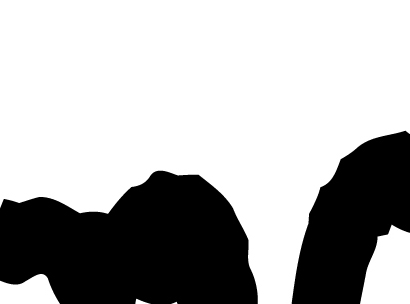
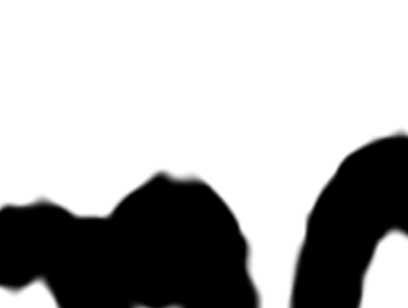
Vector artwork is preferred for screenprinting if you have it. If you had your logo made by a professional designer they should be able to provide this file. Not all types of art are made for vector so don’t stress on trying to convert your art if you aren’t sure. If you do not have vector artwork we need artwork originally created at full print size AND 300dpi resolution. You must ensure that your document is correctly sized BEFORE creating your artwork, otherwise you will have to stretch out the existing pixels and the quality will suffer. On finished artwork, you should be able to zoom in at 100% and not see any “fuzzy” lines! See example below.
When saving/outputting your design, some programs may default the file type to jpeg. Jpegs are good for computer and phone screens, because they compress to take up as little space as possible. Compression is the enemy of good prints! Jpegs are fine for mockups but never ideal for print files. Sending print files that are jpegs or have previously been saved as jpegs (saving a file as a jpeg will always degrade it but changing back to a different file type will never fix it) will almost always require us to retrace and otherwise “fix” your artwork, but even then the results will almost never be as good as if we had a properly formatted file to begin with.
Halftones: If you are using halftones in your artwork, they should be no smaller than 50dpi (we recommend 50 or 45 for most prints) so that all of the smallest dots hold in the screen. If your entire artwork is halftones, like with photo type prints, we generally prefer to generate them in house.
Color Separations: We handle color separations ourselves. Usually we have to tweak a few things slightly to make sure the image works on press. If you already have color separated art, go ahead and send that too!
Fixing/Formatting Art: If we have to go in and fix your art to make it printable, we bill $25 per half hour. Most simple retraces and fixes can be done in an hour or less. If you need something super basic like some text moved over, we’re happy to do that at no cost.